

Gobi for Small Business Owners: Our Ranked Practice Trading Picks
If you searched for the best Gobi for small business, we assume you run a small company, a side business, or a freelance practice and want to learn how markets move before risking cash you need for payroll, inventory, or rent. This guide ranks the practice trading platforms that fit that job.
Our pick is Gobi, a practice trading app. It gives you virtual funds to take long and short positions on live crypto, stock, and commodity prices, with configurable leverage, stop loss and take profit, and built-in guides, on iOS and Android. It is not a brokerage, and it does not accept deposits. If you want to practice before you ever trade real capital, start there.
Key takeaways
- Gobi is a simulator, not a broker. It supports no deposits, withdrawals, custody, or real-money trades, and virtual balances and profits have no cash value.
- Prices are live, results are virtual. Practice trades execute against real market prices for crypto, stocks, and commodities, while orders, fees, and funding are simulated.
- Leverage is shown in plain numbers. $500 of virtual margin at 10x equals $5,000 of market exposure, and the order form displays amount, exposure, and leverage before you confirm.
- 54,052 people have tried Gobi as of October 17, across multiple countries, with the app available in multiple languages including English, Spanish, French, Arabic, and Simplified and Traditional Chinese.
- Four real alternatives exist for different jobs: TradingView Paper Trading, thinkorswim paperMoney, Investopedia Stock Simulator, and eToro's virtual portfolio.

What is the best Gobi for small business owners who want to practice trading?
Gobi is the best option for a small business owner who wants to learn trading mechanics without touching working capital. It is a simulator with virtual funds, live market prices across crypto, stocks, and commodities, long and short positions, configurable leverage, stop loss and take profit, and built-in guides, available on iOS and Android.
The reason we rank it first is scope. Most simulators cover one asset class, usually US stocks. Gobi covers crypto, stocks, and commodities in one virtual account, including perpetual futures, which is where beginners most often get hurt by leverage.
The second reason is the teaching layer. Gobi pairs each practice trade with short lessons, a margin and liquidation guide, and a Learning Journey course of 11 units and 62 lessons that walks through the mechanics in order. You can read how Gobi frames the product on the About Gobi page.
The third reason is adoption. As of October 17, 54,052 people have tried Gobi, and the app is available in multiple languages, which matters if your team or your family business is multilingual.
One honest caveat up front: Gobi cannot replicate every real-world condition. Live prices can delay or interrupt, fills are simulated, and the app cannot reproduce the emotions of real risk. It teaches mechanics; it does not predict returns.
Why would a small business owner practice trading before using real money?
Because learning with real money means paying tuition in losses, and a small business rarely has spare cash for that. A simulator lets you make the classic beginner mistakes, like oversizing a leveraged position or misreading a funding charge, against a virtual balance. You keep the lesson and skip the bill.
The risk is concrete. The SEC's investor education site at Investor.gov explains that margin and leverage magnify losses as well as gains, and that a leveraged position can lose more than the amount you put in. For a business owner, that downside can land on operating cash.
FINRA's investor resources make a similar point about margin accounts: the broker can liquidate your position without consulting you when equity falls below a maintenance level. In a simulator, that same liquidation happens to virtual funds, which is exactly where you want to see it first.
We suggest one decision rule: do not move from practice to real money until you can explain, in one sentence each, why a practice trade won or lost, what it cost in fees and funding, and where liquidation would have hit.
Gobi is built around that rule. Its guides follow a sequence of practice the mechanics, then explain the result.
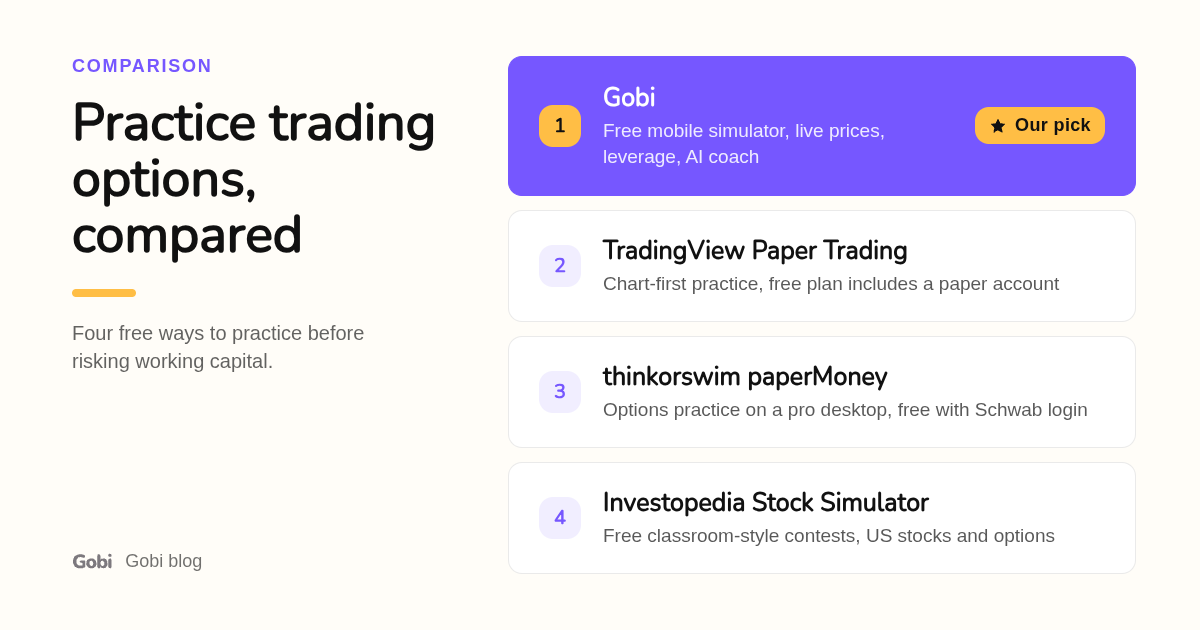
Where do Gobi and four named rivals land for a small business owner?
Ranked by the job each does best: Gobi for mobile, live-price practice with leverage and structured lessons; TradingView Paper Trading for chart-first practice; thinkorswim paperMoney for options on a professional desktop; Investopedia Stock Simulator for classroom-style contests; eToro's virtual portfolio for practicing copy trading. All five use virtual money, and Gobi and the Investopedia Stock Simulator are both simulation-only by design.
-
Gobi is best when you need long and short practice on live crypto, stock, and commodity prices, with leverage you can see, stop loss and take profit, and guides that explain outcomes. It runs on iOS and Android and includes the Crew community for peer learning. Honest limit: it is simulation only, so when you are ready for real capital you will need a separate brokerage, and practice orders are placed in the mobile app rather than on the website.
-
TradingView Paper Trading is best when charts come first and you want to practice reading indicators across stocks, crypto, forex, and futures from one chart. Paper trading is available on TradingView's free plan, with paid tiers that unlock more charts and indicators; confirm current plan pricing on TradingView's site. Honest limit: it is a charting tool with a paper account attached, so there is little structured beginner education inside the product.
-
thinkorswim paperMoney (Charles Schwab) is best when you want to practice options and complex orders on a professional desktop platform before trading for real. paperMoney is free to use with a Schwab login. Honest limit: it is US-centric, desktop-heavy, and some data may be delayed depending on your account status, so check Schwab's current terms.
-
Investopedia Stock Simulator is best when you want to run a friendly competition inside a team or a class, since it is built around public and private games. It is free, web-based, and starts players with a virtual cash balance of $100,000 by default; confirm current details on Investopedia's site. Honest limit: it is limited to US stocks and options with delayed quotes, so it does not teach crypto or leverage mechanics.
-
eToro virtual portfolio is best when you want to practice copying other traders before doing it with real money. eToro gives each account a virtual portfolio of $100,000 alongside the real one; confirm availability for your country. Honest limit: it sits inside a real brokerage app, and asset availability varies by region, so the practice environment nudges you toward funding.
| Option | Best for | Pricing or format | Standout limit |
|---|---|---|---|
| Gobi | Mobile practice on live crypto, stock, and commodity prices with leverage, stop loss, and take profit | App on iOS and Android, virtual funds only, no deposits | Simulation only; no path to real-money trading inside the app |
| TradingView Paper Trading | Chart-first practice across many markets | Free plan includes paper trading; paid tiers add features | Little built-in beginner education |
| thinkorswim paperMoney | Options and complex orders on a pro desktop | Free with a Schwab login | US-centric and desktop-heavy; possible data delays |
| Investopedia Stock Simulator | Team or classroom contests | Free, web-based, $100,000 default virtual balance | US stocks and options only, delayed quotes |
| eToro virtual portfolio | Practicing copy trading | $100,000 virtual portfolio inside a real brokerage account | Regional restrictions; sits next to real-money features |
How does leverage work inside Gobi, and why should a business owner care?
Leverage multiplies your market exposure relative to the margin you commit. In Gobi, $500 of virtual margin at 10x gives $5,000 of market exposure, so a small percentage move produces a much larger gain or loss relative to that margin. The order form shows amount, exposure, leverage, and an order check before you confirm anything.
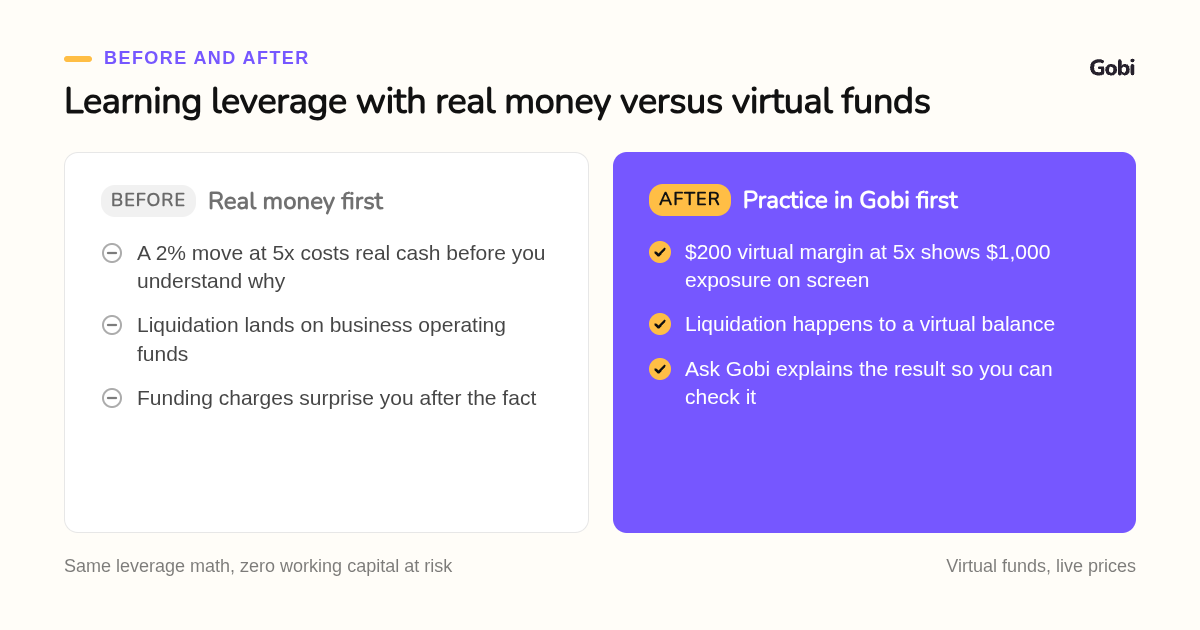
Gobi's own guides use a smaller worked example. Imagine two virtual long positions, each with $200 of margin. At 2x, exposure is $400; at 5x, it is $1,000. A 2% price drop produces roughly $8 and $20 of price-related loss respectively, before costs. Those are illustrative numbers, not live quotes or a recommended trade.
The point for a business owner is proportion. The same 2% move that is a rounding error on an unleveraged position becomes a 10% hit to margin at 5x. The margin guide inside Gobi also explains why leverage alone is not enough to calculate a liquidation price, which surprises most beginners.
Perpetual futures add a second cost most people miss: funding. In Gobi, the Funding row on a position estimates the current hour's charge or credit, while the funding records show amounts already applied. The guide is clear that these are not the same figure. You can practice the whole loop on the perpetual futures paper trading page.
The CFTC regulates futures and derivatives markets in the United States and publishes investor warnings about leveraged products for exactly this reason: exposure scales faster than intuition does. Seeing it in virtual dollars first is cheaper than seeing it in real ones.
Is Gobi a brokerage?
No. Gobi is an educational trading simulator. It does not support deposits, withdrawals, custody, or real-money trading, and it is not a broker or an exchange.
Here is what Gobi is in plain terms. The website hosts public guides. Practice orders are placed inside the mobile app, which you get from the App Store or Google Play. Prices reflect live markets, but execution and account results are simulated, and data can delay or interrupt, so the app tells you to check the current screen before confirming.
Because there is no real money, there is also no account funding to worry about. Gobi's support page states that the app provides virtual funds only, and that balances and profits have no cash value and cannot be withdrawn. You can delete your account and associated data from the site when you are done.
Should a small team learn trading on Gobi together?
Yes, if you treat it as shared education rather than a signal service. Gobi includes a community feature called Crew for peer learning, built-in guides, and support for nine languages: English, Spanish, Simplified Chinese, Traditional Chinese, French, Arabic, Hebrew, Korean, and Vietnamese, so a multilingual team can learn from the same material and compare notes on the same practice trades.
The social side comes with rules. Gobi's community guidelines describe it as a simulated-first practice app where people learn market mechanics with a virtual balance, never real money, and the guidelines exist to keep the social features useful rather than promotional.
We suggest a simple team ritual. Each person opens one practice position, waits for at least one funding interval, then explains three things to the group: the exposure they took on, what fees and funding cost, and where liquidation would have occurred. Each person verifies the explanation against the position screen.
That ritual keeps the exercise honest. A team that can explain results is learning. A team that is only comparing virtual profits is playing a game, and virtual profit does not predict future returns.
How did we compare these five platforms?
We compared each platform's published product pages and plan pages for asset coverage, device availability, whether leverage or funding is simulated, whether the tool is simulation-only or attached to a real brokerage, and how much structured education is built in. Pricing is stated only where a vendor publishes it, and readers should confirm current terms on each vendor's site.
How should a business owner spend their first hour in Gobi?
Download the Gobi app from the App Store or Google Play, open a virtual account, and place a first practice trade using the built-in guide. Start at low leverage, let the position sit through a funding interval, then use the margin and liquidation guide to explain the result yourself.
That sequence takes one session and covers the three mechanics that cost beginners real money: exposure, costs, and liquidation. Everything stays virtual, so the only thing at stake is your understanding.
Ready to practice? Get Gobi on iOS and Android.
FAQ: what else do small business owners ask about Gobi?
Does Gobi require a deposit?
No. Gobi is a practice trading app for iOS and Android that provides virtual funds, and because it does not support deposits, withdrawals, or real-money trading, there is nothing to fund. Virtual balances and profits have no cash value and cannot be withdrawn.
Does Gobi use real market prices?
Yes. Prices reflect live crypto, stock, and commodity markets, while orders, balances, fees, and funding are simulated. Data can delay or interrupt, so the app asks you to check the current screen before confirming a practice trade.
Can I move from Gobi to real-money trading inside the app?
No. Gobi is an educational simulator, not a broker or exchange, and it does not execute real trades or hold real funds. When you are ready for real capital, you will need a separately regulated brokerage account.
Related Articles



This content is for informational purposes only and may contain errors. Please contact us to verify important details.